
PetroVR 2026 Release Notes
PetroVR 2026 introduces the PetroVR AI Assistant, a built-in conversational assistant that brings generative AI directly into your field development planning workflow. Describe what you need in plain language, and the Assistant helps you learn the software, build and modify your models, and move faster from concept to economic evaluation—always keeping you in full control.
Transparency and control are at the core of this new capability. Every change proposed by the Assistant requires your approval, is recorded in the Change Log, and can be reverted. You also decide which AI provider and model to use, connecting your organization’s own account.
In addition, PetroVR 2026 expands the Interactive Simulation with repeatable breakpoints and the ability to pause the simulation when a facility is choking, adds simulation profiling to understand where the time is spent, upgrades the MACRS depreciation method to reflect recent changes in US tax law, and enriches the Well Summary Report with well reserves.
Altogether, PetroVR 2026 marks a significant step forward in productivity, usability, and intelligent assistance for petroleum engineering and economic evaluation.
PetroVR 2026 New Capabilities
AI Assistant:
PetroVR AI Assistant. PetroVR 2026 introduces the AI Assistant, a conversational companion available right inside the PetroVR main window. Explain what you want to do in your own words—just as you would to a colleague—and the Assistant helps you get it done, from answering questions about the software to making changes in your model.

Learn and get answers while you work. The Assistant is grounded in PetroVR’s technical documentation and in a library of solution use cases, so it can explain how a feature works, suggest how to approach a modeling challenge, and guide you to the right objects and options—without leaving the application.
This makes it a valuable ally for new users who are still learning the tool, and a quick reference for experienced users who need a reminder of how a specific capability is configured.
Use case: Import from Excel. Point the Assistant to an Excel workbook—such as production type curves, well lists, or cost tables—and describe in plain language how its contents relate to your model. The Assistant interprets the structure of the spreadsheet, proposes how the data should be brought into PetroVR, and applies it once you approve.
Use case: Bulk Edition. Need to change the same parameter across many objects? Describe the change you want—for example, which wells or facilities are affected and what value to set—and the Assistant identifies the matching objects, shows you the full list of proposed changes, and applies them in a single operation after your approval. A task that would otherwise require opening and editing each object one by one is reduced to a single request.
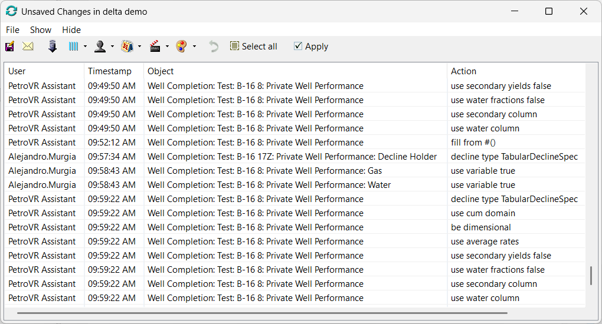
Trust & Control: User empowered, never overruled. The Assistant never changes your model behind your back. Proposed changes are presented for your review and are applied only after you approve them.
Every change made through the Assistant is recorded in the model’s Change Log, so you can trace exactly what was done and when, and revert it if needed. This keeps the modeler—not the AI—as the final decision maker, and preserves the audit trail that quality assurance and review workflows depend on.
Choose your AI provider. The AI Assistant connects to the large language model of your choice, such as models from OpenAI or Anthropic, using an API key provided by you or your organization. Because the model is accessed through your own account, you remain in control of the provider, the model, and the usage policies that apply to your company.
Data privacy and usage. The AI Assistant relies on third-party AI providers. Requests are processed using the tokens of the provider you configure, and usage is billed by that provider. Quorum does not have access to your data.
Quality Assurance:
Interactive Simulation enhancements
PetroVR 2026 builds on the Interactive Simulation introduced in PetroVR 2025 v2 with three improvements that make the step-by-step analysis of your models even more powerful:
Breakpoints that can be hit more than once. Breakpoints are no longer limited to a single hit. Every time the condition of a breakpoint is met again during the run, the simulation pauses, allowing you to follow how the behavior of your model evolves over time instead of inspecting only its first occurrence.
Interactive graphs consistent with final results. The graphs displayed during an Interactive Simulation now reflect the values in the same way as the graphs in the final results do. What you see while debugging your model matches what you will see once the simulation is complete.
Pause the simulation when a facility is choking. A facility’s isChoking condition can now be used as a breakpoint. The simulation pauses at the exact moment a choke occurs, so you can investigate the routing logic and the root cause of production chokes right when they happen.
Speed and Performance:
Profiling the simulation. PetroVR 2026 adds profiling information to the Simulation log, specifying the duration of the different types of activities. This helps you understand where the simulation spends its time and identify which calculations are the most demanding in your current model.
The log reports, for each type of activity, the time spent in seconds and its percentage of the total simulation time. For example:
Building Results: Validation: Checking rules: Calculating period results: Updating histories: Drilling: Routing fluids: Construction: Other: | 00:00:02 -> 7 % 00:00:00 -> 0 % 00:00:01 -> 4 % 00:00:03 -> 10 % 00:00:01 -> 4 % 00:00:01 -> 3 % 00:00:24 -> 66 % 00:00:00 -> 2 % 00:00:01 -> 4 % |
In this example, routing fluids accounts for most of the simulation time, which points to where optimization efforts—or a simulation without routing, when applicable—will pay off the most.
Modeling Power:
IsChoking runtime variable. The new runtime variable IsChoking, present in every facility, can now be incorporated into your FML expressions like any other runtime variable. This allows you to bring the choking status of a facility into the logic of your model.
Improved Rig Planner. The Rig Planner—the internal engine that tries to optimize the drilling sequence during the simulation—has been improved to better account for the gaps in drilling defined in infill drilling campaigns.
MACRS depreciation with 1-year life. The MACRS depreciation method has been upgraded to enable a 1-year life, in accordance with the changes introduced in the US Tax Bill regarding Bonus Depreciation and Cost Segregation in 2025.
Results & Graphs:
Well Reserves in the Well Summary Report. The Well Summary Report has been enhanced to include the value of the Well Reserves (Oil and Gas, for the wells of the respective reservoirs), giving you a more complete view of each well in a single report.
Enhancements and tests included in this version:
40 enhancements to existing features delivered as updates during 2026
338 new functional test cases
46 new unit tests